

Scan, find and get connected!
More than 45 percent of US adults use their smartphones to go online. The arrival 3G has certainly revolutionized the Internet access on mobile devices – it is faster than ever before, but certainly not cheaper. Therefore, one can find people looking for open WiFi networks everywhere.
If you run Android on your mobile, Smart WiFi Pro could serve you a great deal. This app, developed by Appster co., helps users manage WiFi access points. After launching this app, users could see all the available access points in the radar view. These access points are shown in different colors according to their security levels such as WEP, EAP, WPA1 and open.
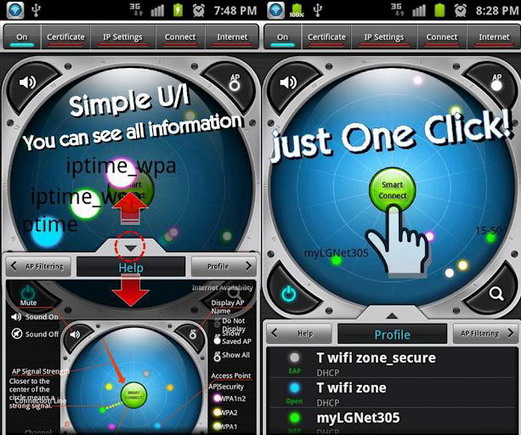
The top bar displays WiFi power status, authentication status, IP setting, WiFi connection and Internet availability. When the WiFi network is not available, Smart WiFi Pro will automatically switch on 3G. However, this is optional and can be disabled through the Settings area of the app. WiFi Donkey is a sharing service that allows Smart Wi-Fi Pro users to access protected APs, if they are ready to share at least one secured AP.
At the bottom of the radar, this app has the Help area, Profile and AP Filtering. This app uses infographics to explain things in details – smart idea, but the text overlaps in a few places making it hard to read. Profile section shows all the previously connected WiFi networks and lets users remove them, filter them and change the IP mode.

As I said, Smart WiFi Pro has a lot of options and new users could know about all of them with a few taps. However, if they are not familiar with IPs, certificates, WiFi security and channels, this app might not impress them. They need to be aware of these things or they should be ready to learn them with this app.
Smart WiFi Pro needs Android 2.2 and up. There is also a free version called Smart WiFi available in the Google Play. If you often look for public WiFi networks when you are on the go, this is the app for you. It can save you some bucks on data charges.





4 comments On Smart WiFi Pro for Easy WiFi Access on Android
WOW, that really simple using process for a WiFi access app on Android! I'm completely impressed to learn about that wonderful app and looking forward to use that app on my new Samsung Galaxy S4 for easy WiFi access. Thanks.
hey there and thanks in your info – I’ve catleinry picked up anything new from proper here. I did on the other hand expertise several technical points using this website, since I skilled to reload the site a lot of times previous to I may just get it to load correctly. I had been puzzling over in case your web hosting is OK? No longer that I am complaining, but sluggish loading circumstances instances will very frequently have an effect on your placement in google and can injury your quality ranking if advertising and ***********|advertising|advertising|advertising and *********** with Adwords. Anyway I’m adding this RSS to my e-mail and can look out for a lot more of your respective exciting content. Ensure that you replace this once more soon..
I couldn’t refrain from commenting. Perfectly written!
I am really loving the theme/design of your site.
Do you ever run into any internet browser compatibility problems?
A few of my blog readers have complained about my blog not operating correctly in Explorer
but looks great in Chrome. Do you have any solutions to help fix this issue?